
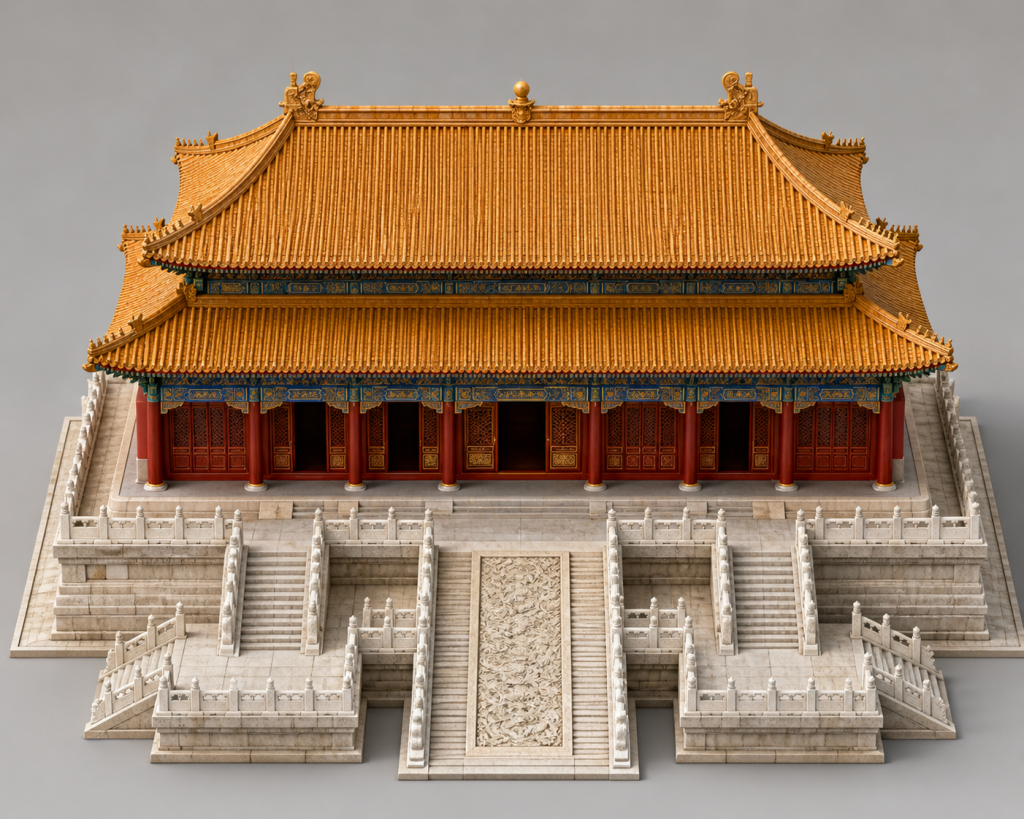
The process is quite simple: first, use Image 2 to generate a complete architectural model, component breakdown diagrams, and construction workflow charts; then, feed these inputs into Seedance 2.0 to generate the animation.
Work that was previously the domain of 3D modeling teams can now be largely accomplished using just these two AI tools.
Specific Workflow & Prompts:
First, use GPT Image 2 to generate a series of reference images:
- Complete Architectural Model
Begin by defining the appearance of the main structure, the camera angle, and the scope of the composition.
[Prompt Reference]:
Please generate an image of the complete, standalone architectural model for “[Building Name].”
The image should display only the main building structure and its immediate surrounding ground; it must not include unrelated buildings, vast empty spaces, urban backgrounds, or complex surroundings. Please emphasize the building’s volume, frontal structure, roof/top form, entrance, facades, and its plinth or foundation sections.
The perspective should be isometric with a slight overhead tilt; the composition should be centered, symmetrical, and crisp—resembling the presentation of a standalone architectural model. The main building structure must occupy more than 70% of the visual area within the frame. This image is intended to serve as a reference for a subsequent AI construction animation depicting the building’s assembly from foundation to completion.
Do not include people, vehicles, modern machinery, text signage, billboards, or any other irrelevant elements. - Structural Breakdown Diagram
Deconstruct the building according to its construction hierarchy—for instance: foundation, plinth, column grid, beam framework, roofing, exterior facades, etc.
[Prompt Reference]:
Based on the reference image of the standalone building “[Building Name],” please generate a structural breakdown diagram (or exploded view) of the architecture.
Maintain the exact same isometric, slightly overhead perspective and composition. Display the building by separating its components vertically according to their construction layers, clearly illustrating the assembly relationships between each structural level.
Please segment the building into logical layers based on its specific characteristics; for example: - Sub-foundation or base footing
- Plinth, platform, floor slab, or base layer
- Columns, walls, doors/windows, or main structural frame
- Beam framework, load-bearing structures, or intermediate structural layers
- Exterior facades, decorative elements, or detailed structural components
- Roofing, top-level structures, or upper cladding
- Final exterior finishes and capping elements
The image should resemble a high-quality architectural explanatory diagram, with each layer vertically offset yet maintaining alignment along a central axis or the main structural core. Each layer must be rendered clearly, cleanly, and distinctly, making the image suitable as a reference for a subsequent AI construction animation. Avoid including figures, modern machinery, scaffolding, temporary supports, text labels, billboards, or unrelated buildings. - Material and Component Diagram Display the main materials and key components separately, similar to a construction materials list.
[Tips for Reference]: Based on the complete model diagram and structural breakdown diagram of the “Building Name” above, generate a diagram showing the building materials and components.
Please arrange the main materials and key components required to construct this building neatly in the image, similar to a construction materials list. Each material or component should be shown as a clear physical sample or an individual component model.
Please include the following types based on the building’s characteristics:
- Foundation, platform, or basic components
- Walls, columns, or main frame components
- Doors, windows, railings, stairs, or entrance components
- Beams, frames, supporting structures, or load-bearing components
- Roof, top covering, or roofing components
- Facade materials, decorative elements, and finishing components
- The building’s most distinctive feature. The image should be a clean material display panel, with an isometric or orthogonal perspective. All components should be clearly grouped, neatly arranged, and have realistic textures. The overall color scheme and material style must match the “Building Name.”
Do not include people, modern machinery, construction scaffolding, text labels, billboards, random objects, or unrelated buildings.
- Construction Flowchart Use 6-8 storyboard panels to depict the process from an empty foundation to a complete building.
[Hint/Reference]: Based on the previous complete model of the “Building Name,” structural breakdown diagram, and material component diagrams, generate an 8-panel construction flowchart. Subject: Construction process of “Building Name” from empty foundation to complete structure.
Please use a consistent isometric slightly overhead perspective, uniform composition, and consistent lighting, keeping the building centered at all times. The image should only show the main building and necessary close-up foundation surroundings; do not show unrelated buildings, large open areas, people, vehicles, or complex backgrounds.
Please generate the sequence for the 8 panels logically, based on the specific structural characteristics of the building in question. The fundamental logic is as follows:
- The empty site or foundational base appears.
- The base layer, platform, podium, or floor slab is formed.
- Stairs, railings, boundaries, entrances, or foundational details are completed.
- Columns, walls, doors/windows, or the main structural framework are erected.
- Beams, load-bearing structures, floor assemblies, or intermediate structural elements are installed.
- The roof skeleton, upper structure, or primary exterior form is completed.
- Roofing, facades, decorative elements, and key distinctive features are progressively finalized.
- The complete, finished building is finally revealed.
Each panel should depict a continuous stage of construction, as if captured by a single, static camera angle; there must be a clear, progressive relationship between the stages. Avoid making Panel 7 and Panel 8 too similar; Panel 7 should represent a near-complete state—approaching the finish line but not yet fully sealed—while Panel 8 presents the final, fully completed structure.
Do not include numerical labels, text tags, arrows, human figures, modern machinery, scaffolding, temporary support structures, billboards, or any other irrelevant modern elements.
Finally, submit all these images as reference inputs to Seedance 2.0, instructing it to generate a 15-second animation that follows this construction sequence.
Note: This prompt serves merely as a reference template; for different architectural projects, specific details may need to be fine-tuned based on the generated results.